Chuka, the AI agent
Chuka reads your rules and logs and works with you in plain words. You need no AI account or key of your own. Everything else in Vyrux works with Chuka switched off.
| Ask | Any question about your deployment, from any page. Chuka knows the page you are on |
| Explain | A search, step by step |
| Review | Whether a rule does what its name says, and the fix when it does not |
| Fix | A broken rule, one change per rule, for you to review |
| Tune | An over-firing rule, with exclusions you can compare first |
| Draft | A new rule from a description or a Sigma rule |
| Identify | An unknown log from a sample |
| Summarise | Figures for a CISO or a board |
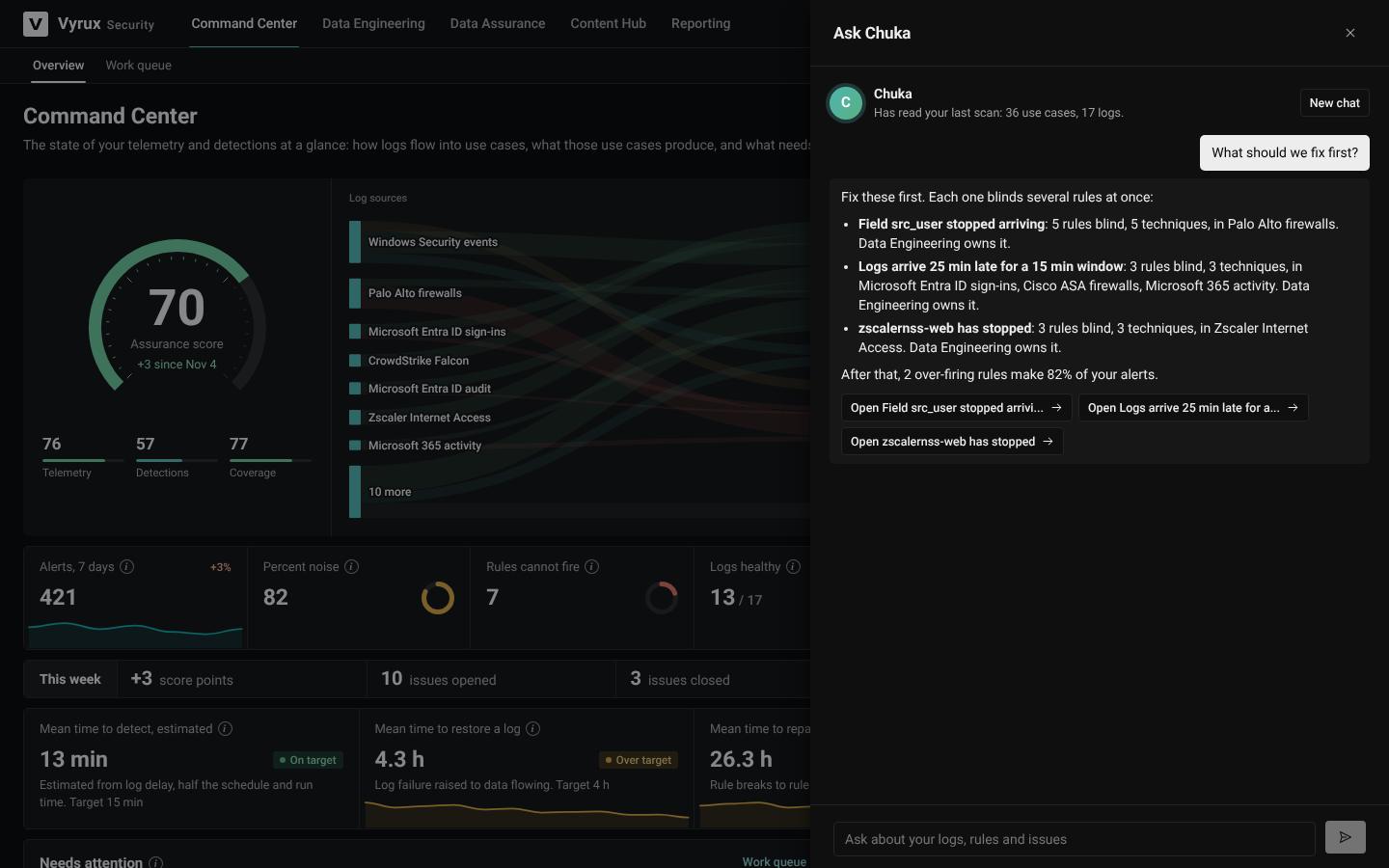
Asking Chuka
Chuka reads your last scan: every issue, the rules that cannot fire and why, the noisiest rules, unhealthy and unused logs, and your ATT&CK coverage. On a rule, log, issue or technique page it also reads that item in full, so "why is this broken?" means this one.
- Answers name the exact rules, logs, fields and counts, and end with buttons that open the page to act on.
- The conversation stays while you move between pages. New chat starts again.
- When the AI service cannot be reached, Chuka still answers from the scan and says so.
Nothing Chuka writes is trusted until Splunk checks it
Every search Chuka writes, when it drafts, fixes or tunes a rule or fits a Content Hub detection, goes through the same loop:
- Your Splunk's own reference first. Before writing, Chuka is given the search command reference of the Splunk version that runs here (Splunk's own searchbnf.conf, read from this server), the data models installed here with their fields (from your Common Information Model add-on), and the fields that really exist in the logs the rule reads: their names, the share of events that have each one, and a few real values (unless sending samples is switched off). Chuka is told to use only commands and data model fields in that reference, and to say what it relied on.
- Splunk checks it. Splunk checks the syntax, every macro, lookup and data model it names, that each index and sourcetype it reads has events, that every field it filters or groups on has values in your latest events, and runs it once over the last 24 hours. Commands that change data or send it out are refused.
- Chuka repairs what failed. Anything Splunk rejects goes back to Chuka in Splunk's own words, with the fields of the logs it tried to read. Up to three tries. Every try and what was wrong with it is shown.
- Only a passing search can be used. Deploy, Apply and Send for approval stay off until every check passes on the exact search shown. Edit it and Splunk checks it again by itself.
Every search Chuka gives in an answer is checked by Splunk the same way as soon as the answer appears, and the result is shown under it. Each answer says the Splunk and Common Information Model versions it was written against and the parts of that reference it used. Advice in words is Chuka's, based on that reference and on your scan; the searches in it are proven by Splunk. A field fix from the CIM validator is tried on your latest 1,000 events at search time before you see it: it shows how many events have the field before and after, and the values it produces against the values CIM allows. Nothing in Splunk changes.
A summary Chuka writes for a report, the Content Hub or a CISO is compared with the figures it was given. If it uses a number that is not in them, the summary is not used and Vyrux says which number.
Review and fix a rule
On a rule, the Intent tab shows what the background scan found about whether the rule looks for what it is meant to detect, with Splunk's proof of each mismatch (see Rules). Below it, Check with Chuka reviews the rule on request against its name and description. When it finds gaps, Fix with Chuka writes the corrected search from them. Test both versions runs the old and new search on the same time range, then Apply the fix changes it in Splunk, or sends it for approval when your policy needs a second approver. The review and the fix stay while you look at other tabs.
Every wait on Chuka shows what it is doing and how long it has taken, and can be cancelled. Vyrux stops waiting after five minutes for a fix that is written, checked and repaired, and nothing changes in Splunk until you apply it.
What leaves your server
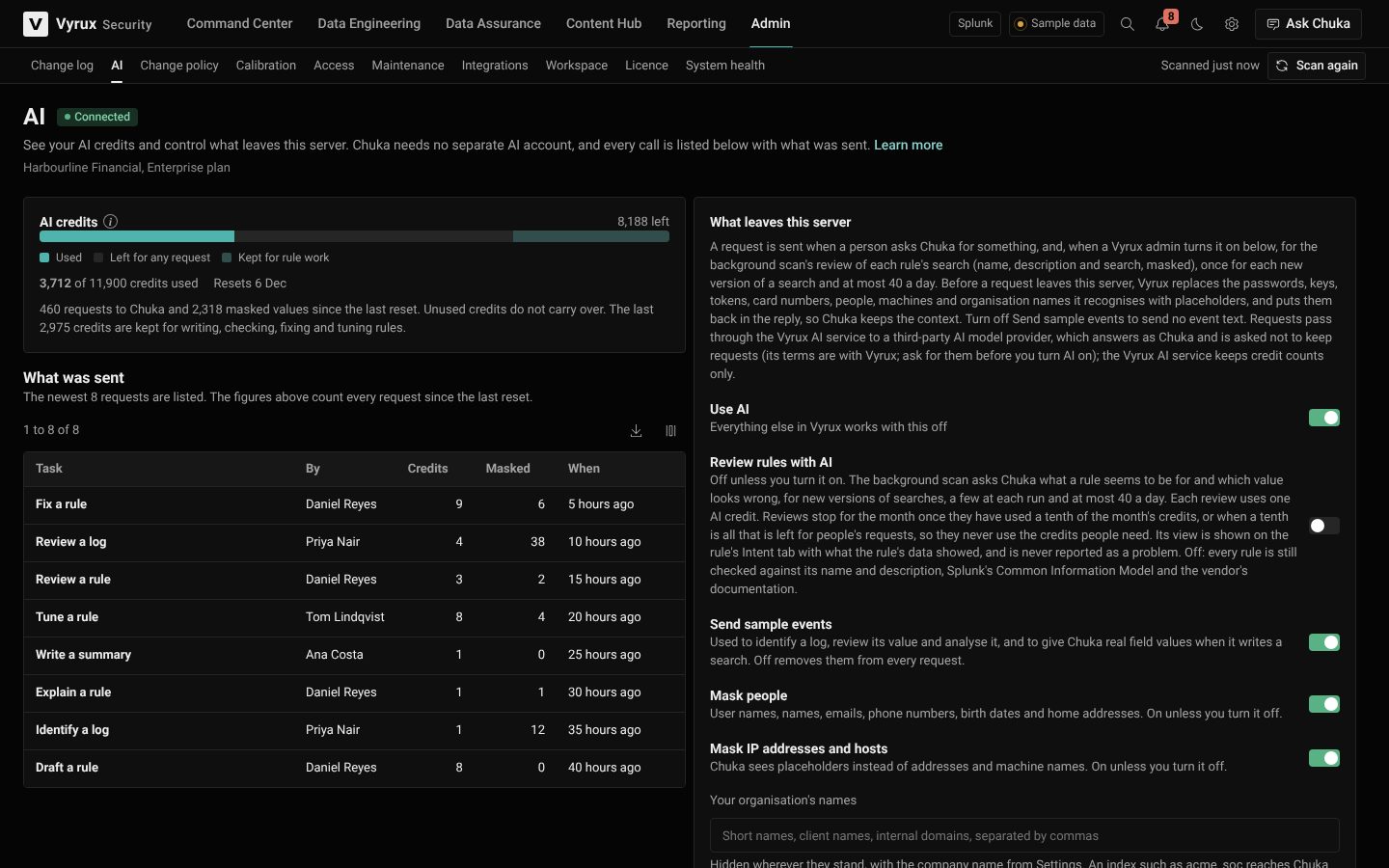
A request is sent when a person asks Chuka for something, and, once a Vyrux admin turns on Review rules with AI under Admin, AI, for the background scan's review of each rule's search (name, description and search, masked), once for each new version of a search and at most 40 a day: opening a page sends nothing. Before a request leaves your server, the passwords, keys, tokens, card numbers, people, machines and organisation names Vyrux recognises are replaced with placeholders, and put back in the reply, so Chuka keeps the context. An admin can turn off masking of people and machines under Admin, AI. See Security and data handling. Rule text and samples pass through the Vyrux AI service to a third-party AI model provider, which answers as Chuka. The service keeps only credit counts, never the content. You can switch off Chuka, or only the sending of sample events, under Admin, AI. With sample events off, no request carries event lines or real field values, whatever the task.
Admin, AI lists every request: who made it, when, the task, the credits it used and how many values were masked. Open a request to read the whole request as it left your server after masking, and the whole reply as it came back. The person who made a request and Vyrux admins can read its text; everyone else sees the line only, because a request can hold sample events from an index their own roles cannot read. The Vyrux AI service adds its fixed instructions for the task before passing both to the model. Under each Chuka answer, How Chuka answered shows the same for that answer.
The page lists the newest 2,000 requests. The figures above the list, and the request counts in report decks, are counted by the Vyrux service over every request it has kept, which is 400 days.
AI credits
Each plan includes AI credits every month, and double in the first month, because setting up uses the most AI. A question uses about one credit. Fixing or writing a rule uses a few more.
- Credits reset each month on your billing day. Unused credits do not carry over.
- The last quarter of each month's credits is kept for people's rule work: writing, fixing and tuning rules. Questions, summaries and log reviews pause at three quarters.
- The background scan's rule review is off until a Vyrux admin turns it on. It uses one credit a rule, at most a tenth of the month's credits, and stops when a tenth is all people have left before the kept quarter. Admin, AI shows what it used.
- When Chuka cannot use AI, it answers only the questions the last scan can answer (what to fix first, late, unused or noisy logs and rules, silent hosts, where a page is) and says plainly that it cannot answer anything else.
- Before Chuka fixes the rules of a root cause, Vyrux shows about how many credits it will use.
- Extra credits can be bought under Admin, Licence. They last until the next reset.
Chuka can also answer "which hosts stopped sending?" from the background scan's host figures. Host names go as placeholders unless an admin turned network masking off.